17 Playwright Best Practices That Actually Matter (With Code)
Find best practices that separate production-grade Playwright setups from tutorial code, with working examples for every pattern.




Playwright best practices are the patterns that keep an end-to-end suite fast, readable, and stable as it grows. In short: test what users see, lock onto role-based locators, let assertions auto-wait, isolate every test, seed data through the API, and watch flaky tests with real reporting in CI.
The 17 practices below each come with a runnable code example and the specific failure it prevents. Work top to bottom for a new suite, or jump to the section you need.
The code snippets target Playwright 1.60.0, so a few practices use APIs that landed in recent releases.
Define your test coverage goals
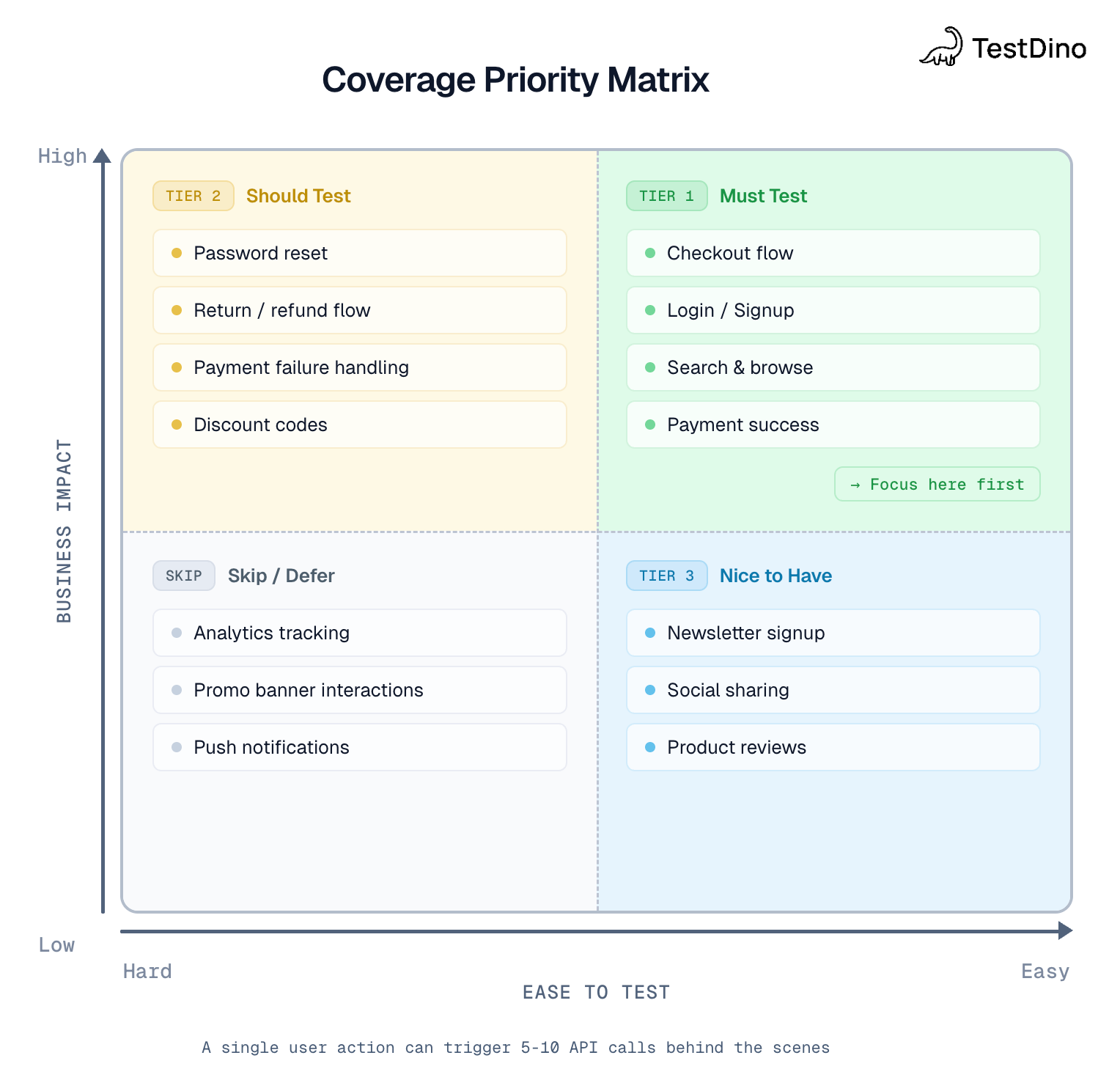
End-to-end tests are slow and expensive to maintain, so spend them where a failure costs you the most. Cover the paths that make you money and the ones that page someone at night: sign-up, login, checkout, and the core action your product exists to do. Push everything else down to unit and integration tests.
Aim for roughly 30% of your total suite as E2E. A test that asserts a button is blue belongs in a unit test. A test that proves a guest can pay belongs here.
// E2E: prove the path works end to end
  test('user can complete checkout', async ({ page, request }) => {
    const userId = await request.post('/api/test/user/create').then(r => r.json());
    await page.goto('https://storedemo.cms.testdino.com/');
    await page.getByText('Apple iPad Air').first().click();
    await page.getByRole('button', { name: /add to cart/i }).click();
    await expect(page.getByText('Cart')).toBeVisible();
  });

Tip: Use your analytics data quarterly to revisit coverage priorities. What users do today might change in 6 months. Keep your test portfolio aligned with reality. For a structured approach, see our Playwright automation checklist.
Test what users see, not how it's built
A user does not know your component is called <CheckoutButton data-state="ready">. They see a button that says "Pay". When you assert against internal class names or state attributes, your test breaks every time a developer refactors markup that the user never notices.
Target the visible, semantic surface instead.
// Brittle: breaks on any markup refactor
  await page.locator(".btn.btn--primary.checkout-cta").click()
  // Resilient: survives refactors, mirrors the user
  await page.getByRole("button", { name: "Pay" }).click()
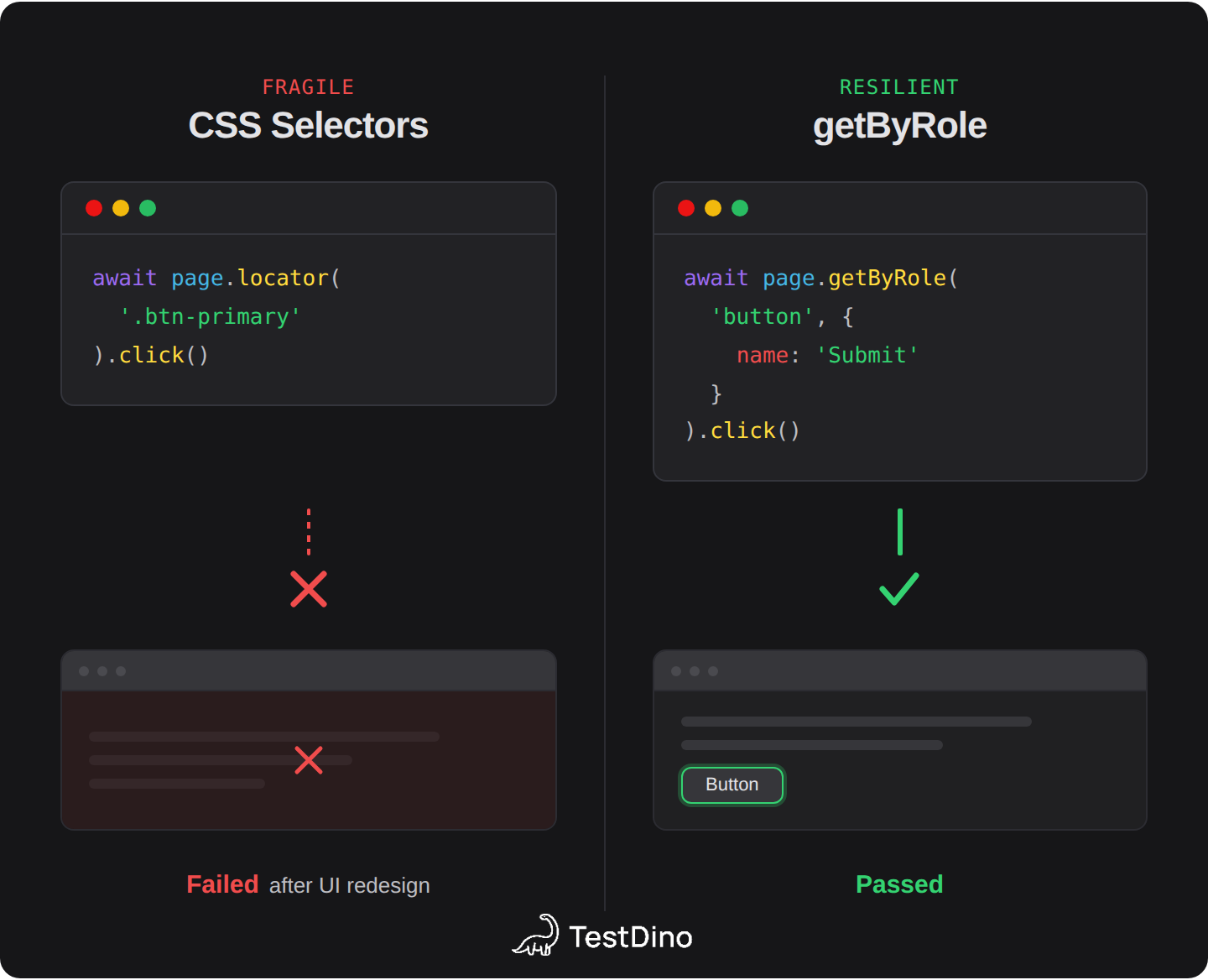
Rule of thumb: If you delete the element's class attribute and the user experience stays the same, your test shouldn't break either. This is one of the most important Playwright best practices because it affects everything downstream: locator stability, assertion reliability, and maintenance cost.
Use stable locators
Playwright ranks locators by how closely they match what a user perceives. Reach for the top of this list first and drop down only when you have to:
- getByRole(): the accessible role and name
- getByLabel(): form fields by their label
- getByPlaceholder(): inputs by placeholder
- getByText(): non-interactive content
- getByTestId(): an explicit data-testid hook
- CSS or XPath: last resort
Role locators eliminate more flaky tests than any other single change, because they survive markup churn and double as an accessibility check.
// Chain to scope without brittle CSS paths
  const row = page.getByRole("row", { name: "Standing desk" })
  await row.getByRole("button", { name: "Remove" }).click()
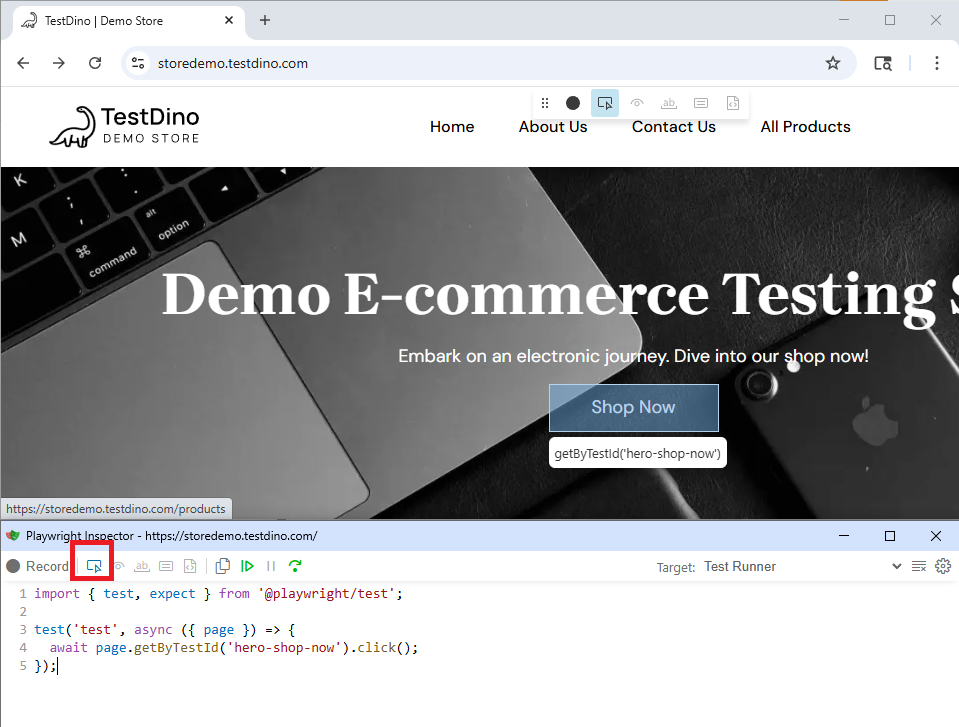
Use npx playwright codegen https://storedemo.cms.testdino.com/ to auto-generate locators by recording interactions.
Name tests and steps for the failure
A test title is the first thing you read when CI goes red. "checkout works" tells you nothing. "checkout charges the card and shows the order number" tells you exactly what broke. Name each test after the behavior it proves, and wrap multi-action flows in test.step() so the trace reads like a sentence.
test("checkout charges the card and shows the order number", async ({ page }) => {
    await test.step("add item to cart", async () => {
      await page.getByTestId("add-to-cart-button").click()
    })
    await test.step("open cart and check out", async () => {
      await page.getByTestId("header-cart-icon").click()
      await page.getByTestId("checkout-button").click()
    })
    await test.step("place the order", async () => {
      await page.getByTestId("checkout-place-order-button").click()
    })
  })
A failing step name points straight at the broken action, so you open the right trace first.
Keep tests focused and isolated
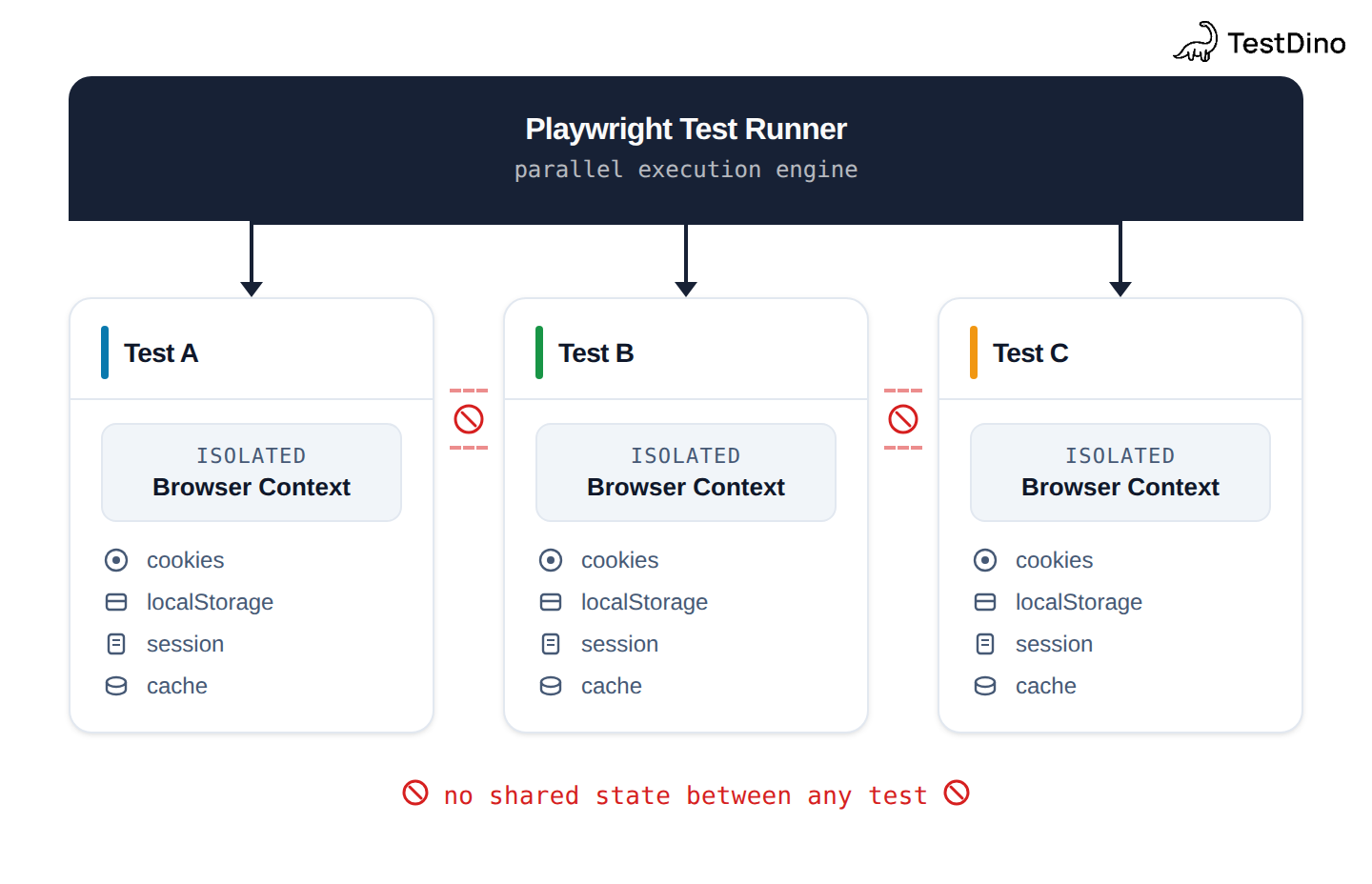
Each Playwright test runs in its own browser context with independent cookies, localStorage, session storage, and cache. No test should depend on the state left behind by another test. This is a Playwright best practice that prevents cascading failures.
Use beforeEach hooks for shared setup:
import { test, expect } from '@playwright/test';
  test.beforeEach(async ({ page }) => {
    await page.goto('https://storedemo.cms.testdino.com/login');
    await page.getByLabel('Email').fill('[email protected]');
    await page.getByLabel('Password').fill('securepassword');
    await page.getByRole('button', { name: 'Sign in' }).click();
    await expect(page.getByText('My Account')).toBeVisible();
  });
  test('user can view their profile', async ({ page }) => {
    await page.getByRole('link', { name: 'Profile' }).click();
    await expect(page.getByRole('heading', { name: 'My Profile' })).toBeVisible();
  });
For larger suites, logging in before every test wastes time. Use Playwright's setup project to authenticate once and share the session:
export default defineConfig({
    projects: [
      { name: 'setup', testMatch: /.*\.setup\.ts/ },
      {
        name: 'chromium',
        dependencies: ['setup'],
        use: { storageState: './auth.json' },
      },
    ],
  });
setup('authenticate', async ({ page }) => {
    await page.goto('https://storedemo.cms.testdino.com/login');
    await page.getByLabel('Email').fill('[email protected]');
    await page.getByLabel('Password').fill('password');
    await page.getByRole('button', { name: 'Sign in' }).click();
    await expect(page.getByText('My Account')).toBeVisible();
    await page.context().storageState({ path: './auth.json' });
  });
Write assertions that wait automatically
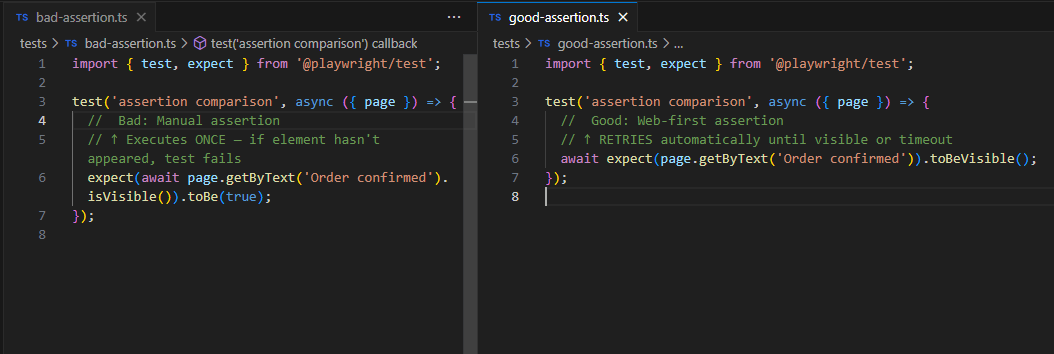
Web-first assertions retry until the condition is true or the timeout expires. Manual checks run once, the instant you call them, and fail the moment the UI is a frame behind. The difference is most of your flaky tests.
// Bad: Manual assertion, checks once
  expect(await page.getByText('Cart').isVisible()).toBe(true);
  // Good: Web-first assertion, retries until visible or timeout
  await expect(page.getByText('Cart')).toBeVisible();
Never wrap an assertion in a manual waitForTimeout(). If you need to wait, assert the thing you are actually waiting for. For a deeper dive into debugging assertion failures, check our Playwright debugging guide.
Assert the accessibility tree, not the DOM
A full ARIA snapshot locks in the structure a user and a screen reader perceive, without pinning you to specific markup. As of Playwright 1.60, toMatchAriaSnapshot() works on a whole page, not only a single locator, so you can guard an entire view in one assertion. See our deep dive on the accessibility tree for how Playwright builds it.
// Snapshot the page's accessibility tree
  await expect(page).toMatchAriaSnapshot(`
    - heading "Your cart" [level=1]
    - list:
      - listitem: /Standing desk/
    - button "Checkout"
  `)
This catches a heading that silently became a <div>, or a button that lost its label, while ignoring the cosmetic class changes that break a CSS-based assertion.
Use APIs to seed test data
Clicking through a sign-up form to create a user before every test is slow and fragile. Hit your API instead. Setup that takes ten UI actions becomes one request, and it does not break when the sign-up page changes.
test.beforeEach(async ({ request }) => {
    const userResponse = await request.post('https://storedemo.cms.testdino.com/api/test/users', {
      data: {
        email: '[email protected]',
        password: 'secure-password-123',
        firstName: 'Test',
        lastName: 'User'
      }
    });
    const user = await userResponse.json();
  });
For complex scenarios, create a factory to generate consistent test data:
export class TestDataFactory {
    constructor(private request: APIRequestContext, private baseUrl: string) {}
    async createUser(overrides?: Partial<{ email: string; name: string }>) {
      const response = await this.request.post(`${this.baseUrl}/api/test/users`, {
        data: {
          email: `user-${Date.now()}@test.com`,
          password: 'test-password-123',
          firstName: 'Test',
          lastName: 'User',
          ...overrides
        }
      });
      return response.json();
    }
  }
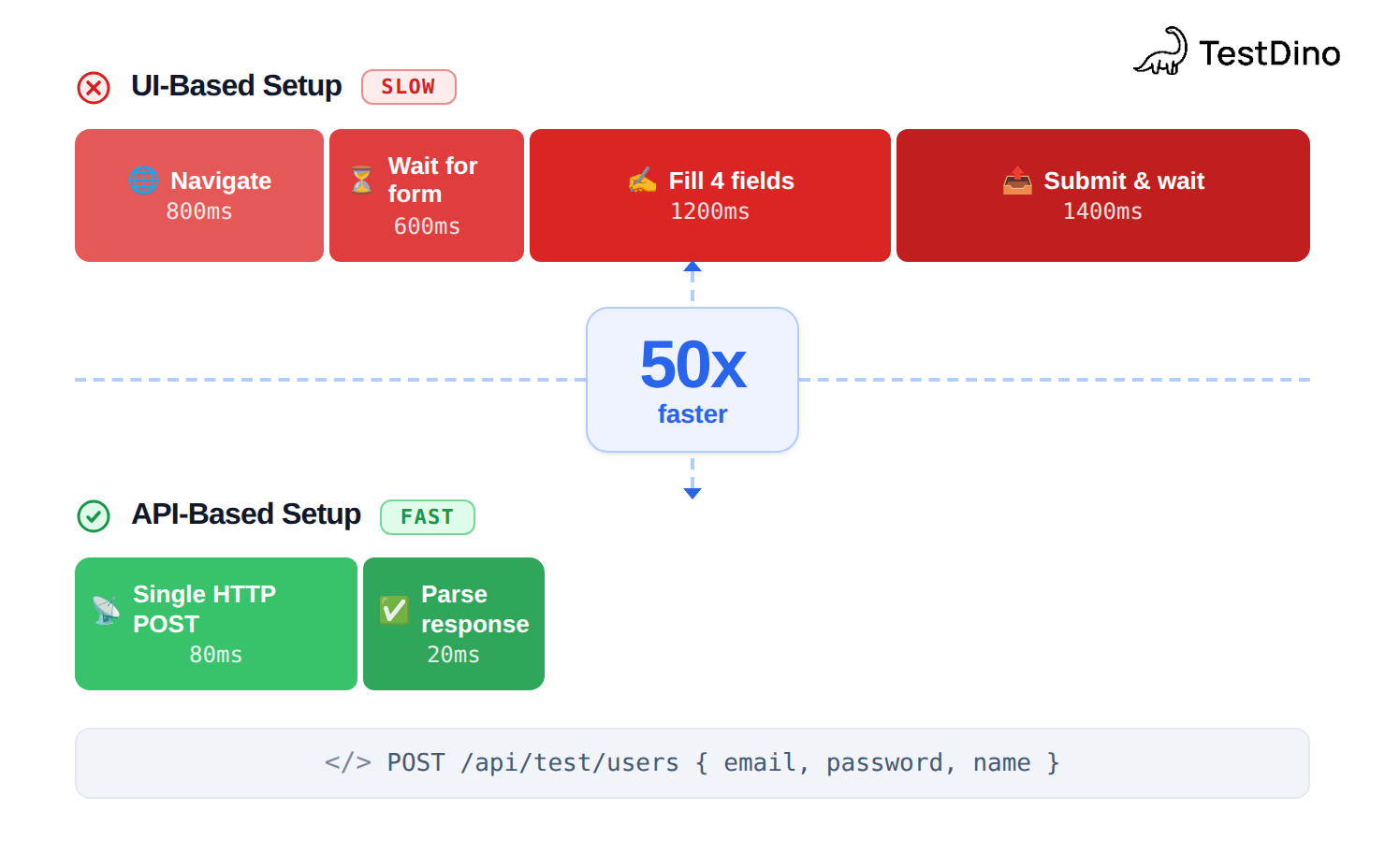
Reserve UI steps for the behavior you are actually testing. Everything before that point should arrive through the fastest door available.
Tip: Create a dedicated /api/test/* endpoint on your backend that only exists in non-production environments. Always clean up test data in afterEach hooks to keep your environment clean.
Reset database state between runs
Seeding through the API gets you a fast, known starting point. It does not undo what a test wrote. A test that creates an order leaves that order behind, and the next run inherits it.
Reset the data your tests mutate, either with a teardown that deletes what the test created or a per-run snapshot you restore before the suite starts.
test.afterEach(async ({ request }) => {
    await request.delete(`/api/test/orders?runId=${process.env.RUN_ID}`)
  })
Without a reset, a suite that passes on a clean database fails the second time you run it, and that failure looks like flake when it is really dirty state.
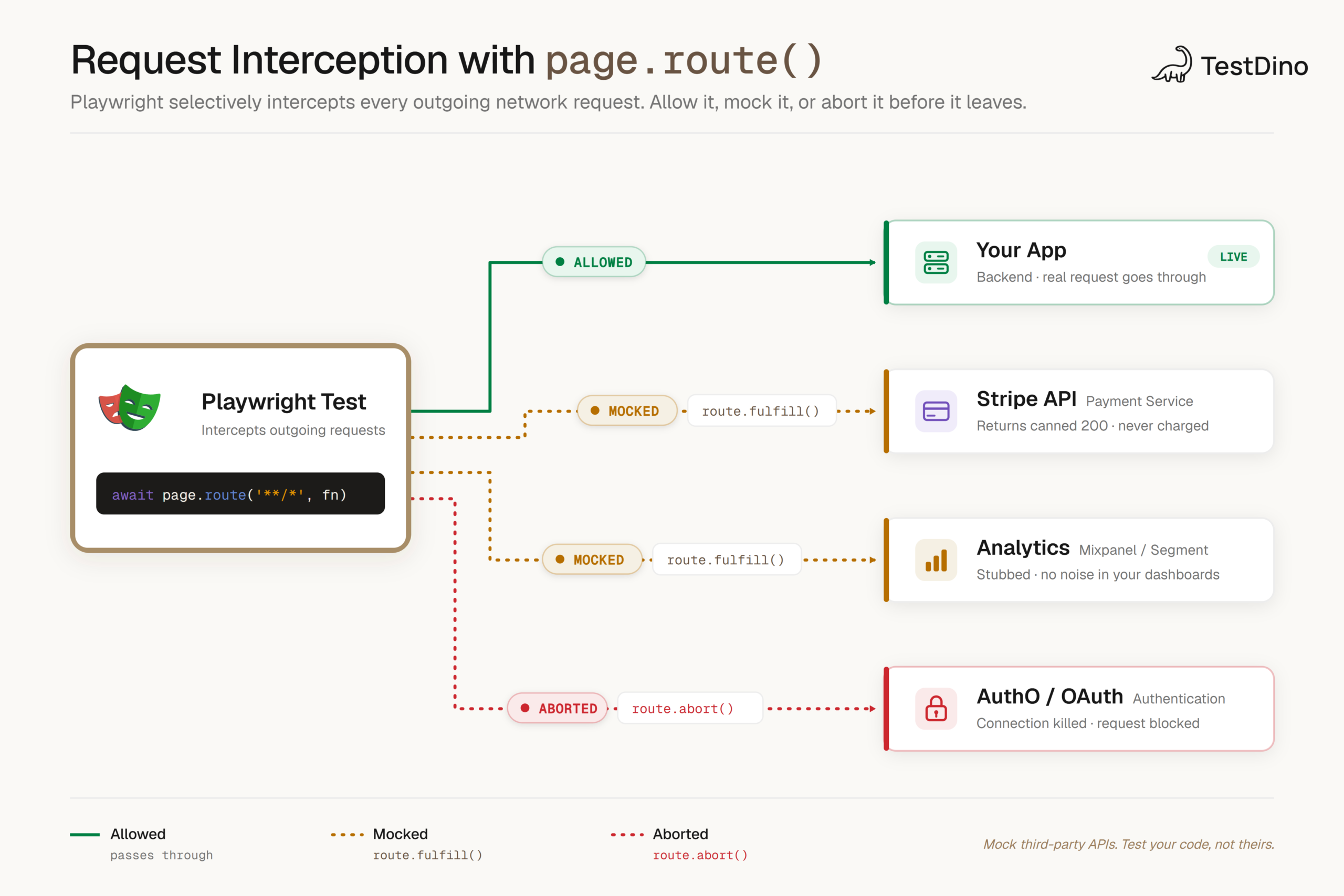
Mock external dependencies with page.route()
You do not control a payment provider's sandbox uptime or a weather API's rate limit, so do not let them decide whether your suite passes. Intercept the request and return a fixed response with network mocking. Your test stays deterministic and runs offline.
await page.route("**/api.stripe.com/**", (route) =>
    route.fulfill({
      status: 200,
      json: { id: "ch_test_123", status: "succeeded" },
    }),
  )
Mock the third party, then assert that your application correctly responds to its response. That is the part you own.
Structure your project for scale
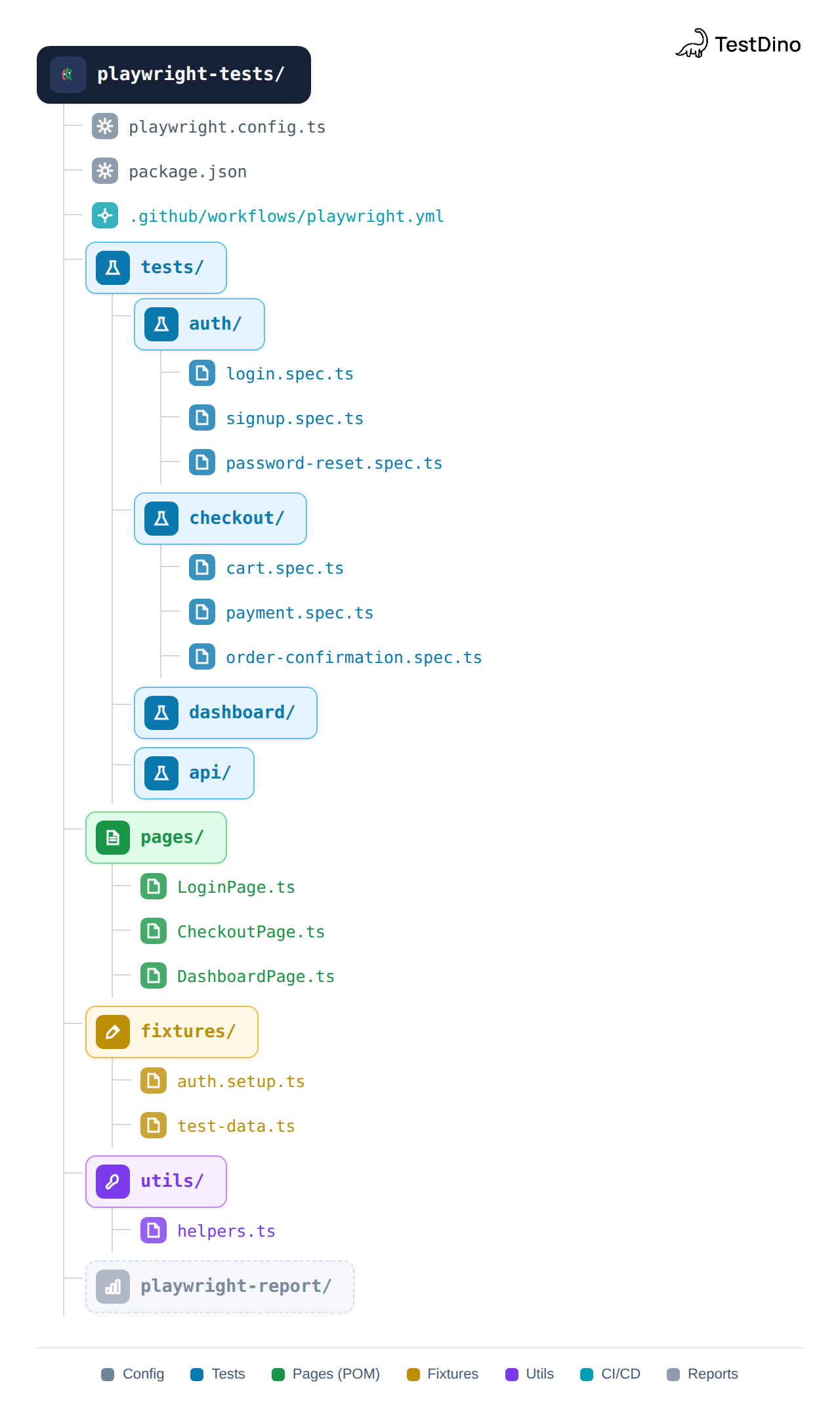
A flat folder of 200 test files is unsearchable by week three. Group by feature, and pull repeated setup into fixtures and helpers so a UI change touches one file, not fifty.
tests/
    checkout/
      checkout.spec.ts
      coupon.spec.ts
    fixtures/
      auth.ts
    pages/
      checkout-page.ts
Keep snapshot files predictable, too. The {testFileBaseName} token, added in 1.60, names snapshots after the spec file without its extension, which keeps a large suite's snapshot folder readable.
export default defineConfig({
    snapshotPathTemplate: "{testDir}/__snapshots__/{testFileBaseName}/{arg}{ext}",
  })
Master Playwright's debugging tools
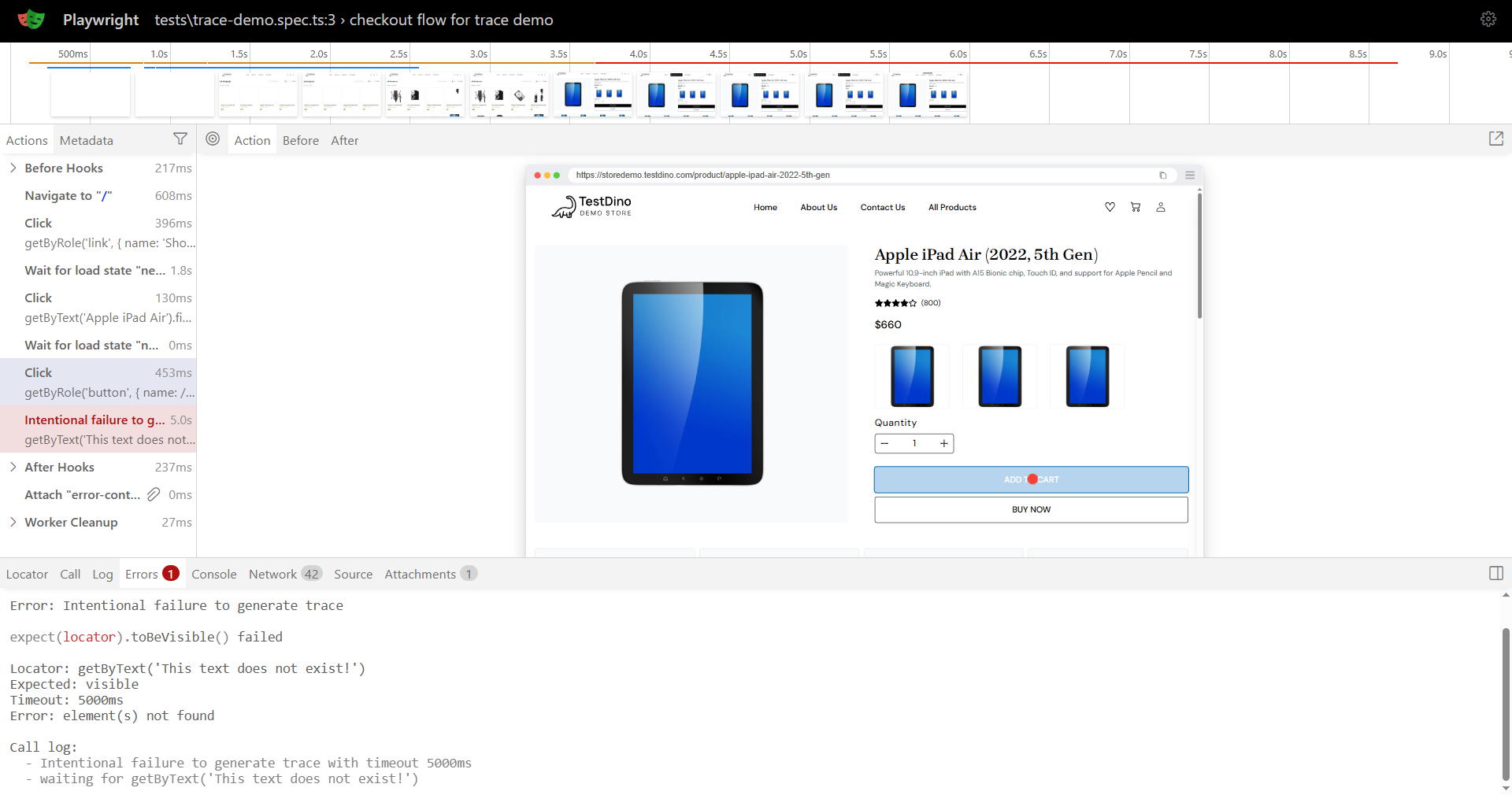
Pick the tool that matches the failure:
- UI Mode (--ui): watch tests run, time-travel through steps, edit locators live.
- Inspector (--debug): step through a single test and try locators in real time.
- Trace Viewer: open the trace from a CI failure and see the DOM, network, and console at each step.
Turn tracing on for failures so a red CI run hands you a full recording instead of a stack trace.
export default defineConfig({
    use: { trace: "on-first-retry" },
  })
In 1.60, a failed expect() also attaches the accessibility snapshot of the element at the moment it failed through errorContext, so the trace shows you what the page actually looked like when the assertion gave up.
Abort tests early when a precondition fails
When a fixture or route handler hits a state that makes the rest of the test meaningless, stop immediately rather than letting it run on to a confusing timeout. Playwright 1.60 added test.abort() for exactly this: it now fails the running test with a message explaining why.
test.beforeEach(async ({ request }) => {
    const health = await request.get("/api/health")
    if (!health.ok()) {
      test.abort("Staging API is down — skipping to avoid noise.")
    }
  })
An aborted test with a clear message reads as an environment problem, not a product bug, so nobody wastes time debugging your code for an outage upstream.
Parallelize and shard across CI
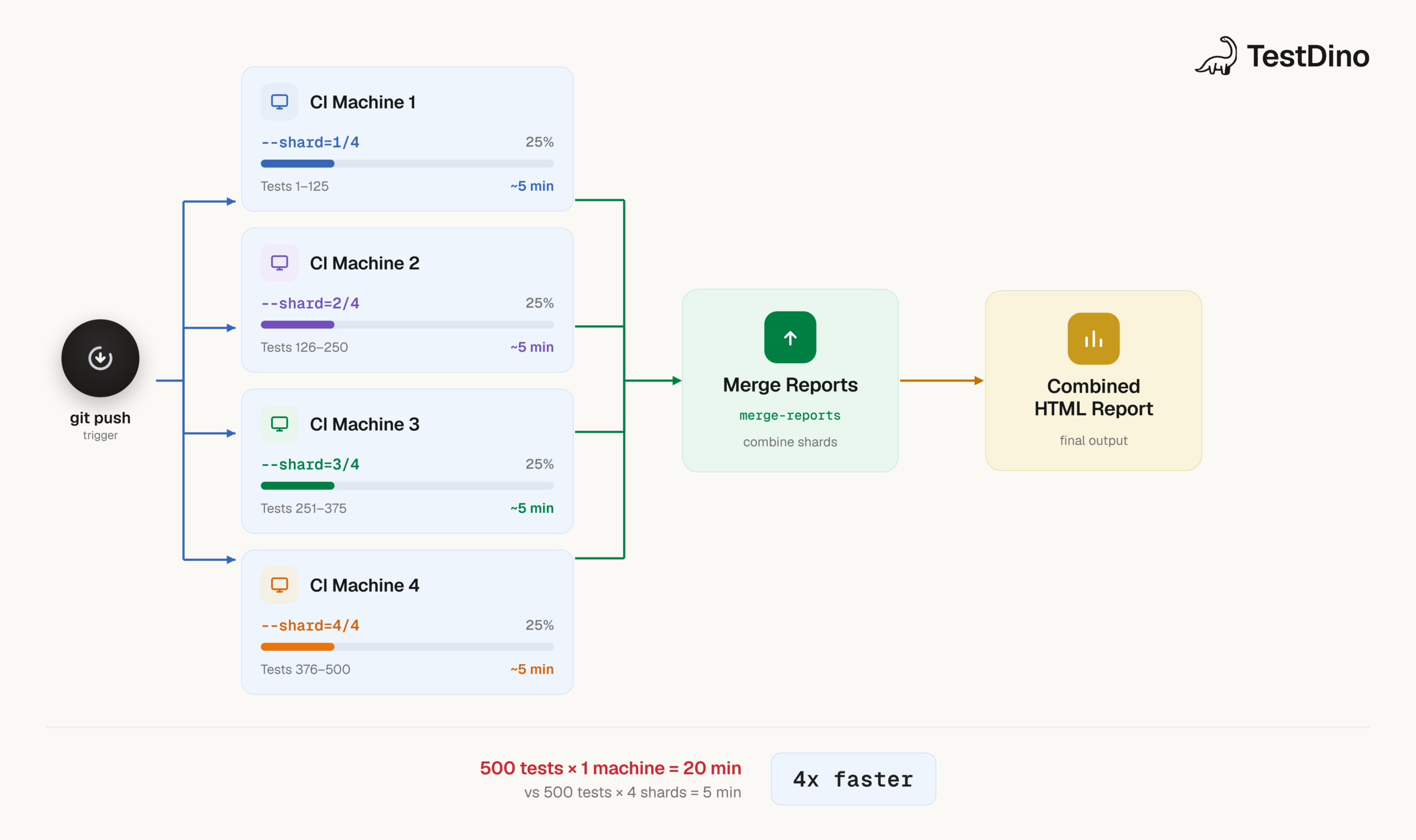
Playwright runs files in parallel by default. To go faster on CI, split the suite across machines with sharding and let each runner take a slice.
# GitHub Actions
  strategy:
    matrix:
      shard: [1, 2, 3, 4]
  steps:
    - run: npx playwright test --shard=${{ matrix.shard }}/4
Install only the browsers a job needs with npx playwright install --with-deps chromium so CI setup does not download three engines you are not using on that run.
Eliminate flaky tests
A test that passes and fails on the same code teaches your team to ignore red, and that is how real bugs ship. Most flaky tests come from a short list of causes:
- A missing await on an async call.
- A manual waitForTimeout() instead of a web-first assertion.
- Random or time-based data that differs between runs.
- A test depending on state another test created.
- An element that exists in the DOM but is hidden or animating.
Catch the missing-await class at lint time before it ever runs.
rules: {
    "@typescript-eslint/no-floating-promises": "error",
  }
For the rest, retry once to confirm a failure is real, then track which tests fail intermittently over time so you fix the worst offenders instead of muting them.
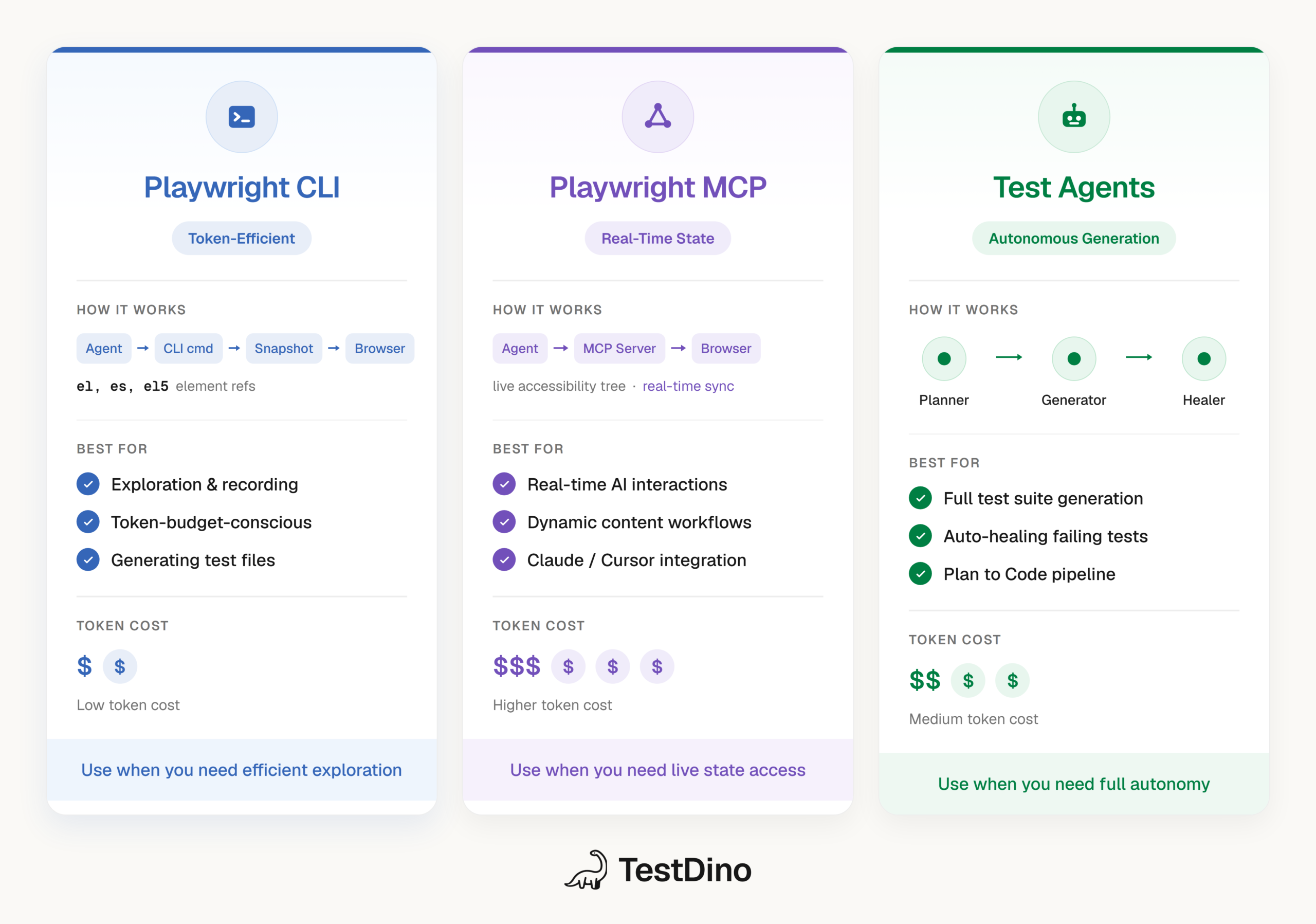
Use Playwright AI agents to generate and heal tests
Playwright's agent workflow can draft a test from a plain-language plan, run it, and propose a fix when it breaks. Treat the output as a first draft: review every generated locator and assertion before it lands, because an agent will happily assert the wrong thing with full confidence.
Give the agent the same locator rules you follow. When it knows to prefer getByRole() and web-first assertions, the code it writes needs far less cleanup than a cold prompt.
Centralize reporting for CI
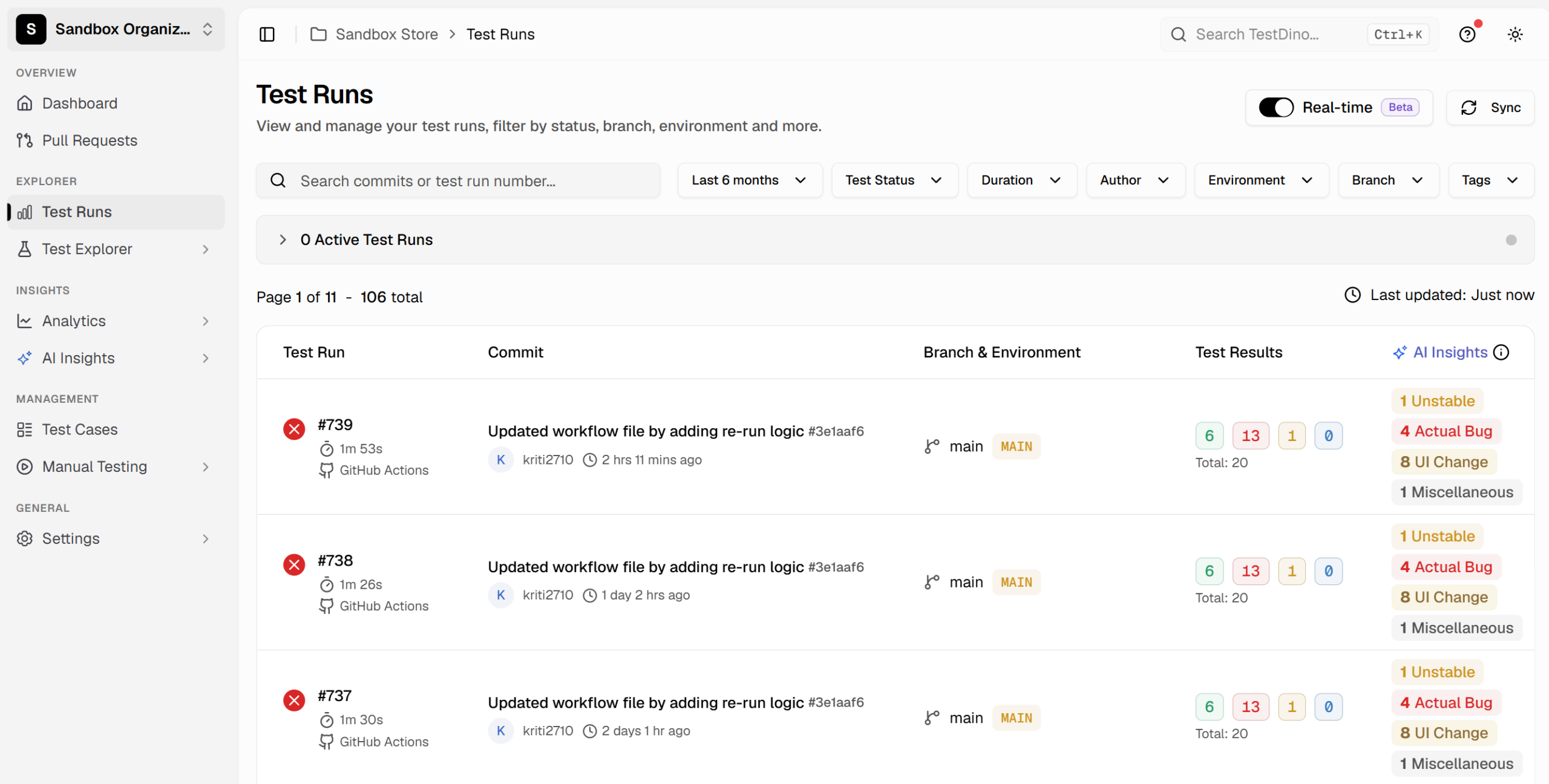
Playwright's built-in HTML report is per-run and lives on the machine that produced it. On a real team, you want history: which test started failing, on which branch, after which commit, and whether it is a new bug or an old flake.
Stream results to a reporter that keeps that history across runs and groups failures by root cause, so a wall of red collapses into the handful of causes behind it. TestDino does this for Playwright, with failure classification and flake tracking tied back to the pull request that triggered the run.
export default defineConfig({
    reporter: [["html"], ["@testdino/playwright"]],
  })
Quick reference
| Practice | Command or pattern |
|---|---|
| Run in UI mode | npx playwright test --ui |
| Debug a single test | npx playwright test --debug |
| Shard across 4 runners | npx playwright test --shard=1/4 |
| Install one browser | npx playwright install --with-deps chromium |
| Trace on retry | use: { trace: "on-first-retry" } |
| Reuse login | test.use({ storageState: "..." }) |
| Snapshot the a11y tree | await expect(page).toMatchAriaSnapshot(...) |
| Abort on bad precondition | test.abort("reason") |
FAQs
Table of content
Flaky tests killing your velocity?
TestDino auto-detects flakiness, categorizes root causes, tracks patterns over time.
Follow Us