Keen Cut Playwright Triage to 15 Min with TestDino
Keen's QA team replaced the default Playwright reporter with TestDino and turned a half-day triage slog into a 15-minute task, saving weeks of work across the team.




Keen builds an AI-native marketing decision system, the kind of product that decides where serious marketing budget goes. When the software makes calls across 100% of a marketer's working dollars, the test suite behind it has to hold up, and a failed run has to be understood fast.
The team runs Playwright tests in CI, and for a while, the default Playwright reporter was how the QA team made sense of every run. It worked at first. But as the suite grew, reading those reports turned into a half-day chore. Failures piled up, flaky tests crept in, and triage ate hours that the team did not have.
This case study walks through what changed once Keen brought in TestDino: how the QA team went from half-day triage cycles to 15-minute ones, and what they use today.
Company Overview
Keen is an AI-native marketing decision system.
The Keen Platform helps marketers make decisions across 100% of their working dollars, measuring incremental revenue, ROI, and net profit across the full budget, both short-term performance and multi-year brand effects.
It unifies measurement, planning, forecasting, and accountability in one place. For a product like that, reliable test feedback is not optional.
Daniel Bacigalupo Overview
Daniel Bacigalupo is the Quality Assurance Manager at Keen. He runs QA for the Keen Platform, where the team works async with development and owns test reliability end-to-end.
TestDino sits squarely inside his day-to-day: triaging failures, hunting down flaky tests, and keeping the team out of cluttered logs.
Keen's Playwright Testing Setup
Keen runs Playwright tests in its CI pipeline, with QA working async with development. The default Playwright reporter was the only layer between a CI run and an answer.
 We were on the default Playwright reporter, and it was tedious to dig through. Half a day gone just triaging failures.


Key Challenges Faced by Keen
The default reporter gave Keen output, not answers. As the test suite scaled, a handful of problems stacked up:
- Limited visibility into failures. The reports showed that tests failed, but not the context the team needed to act quickly.
- Hard to debug from reports. Getting from a red result to a root cause meant digging through cluttered logs, one failure at a time.
- No flaky test detection. Flaky tests were increasing, and there was no clean way to spot them or tell them apart from real bugs.
- No useful analytics. There was no view of patterns or trends across runs.
- Manual triage in CI. Every failed run meant manual analysis, and the time added up.
- Hard to share results. Getting test results in front of the rest of the team took extra effort.
Two of these got worse with scale: failures became harder to track, and the number of flaky tests climbed. The team was spending real hours combing through logs per failed or flaky test just to figure out what happened.
How TestDino Helped in Keen's Workflow
The thing that changed Keen's workflow most was the TestDino MCP.
Instead of opening the CI run, locating the report, and reading through logs line by line, Daniel pulls the latest runs straight through the MCP and works the failures from there.
Using the MCP to pull the latest runs has been incredible. It sped up triage of bugs drastically.
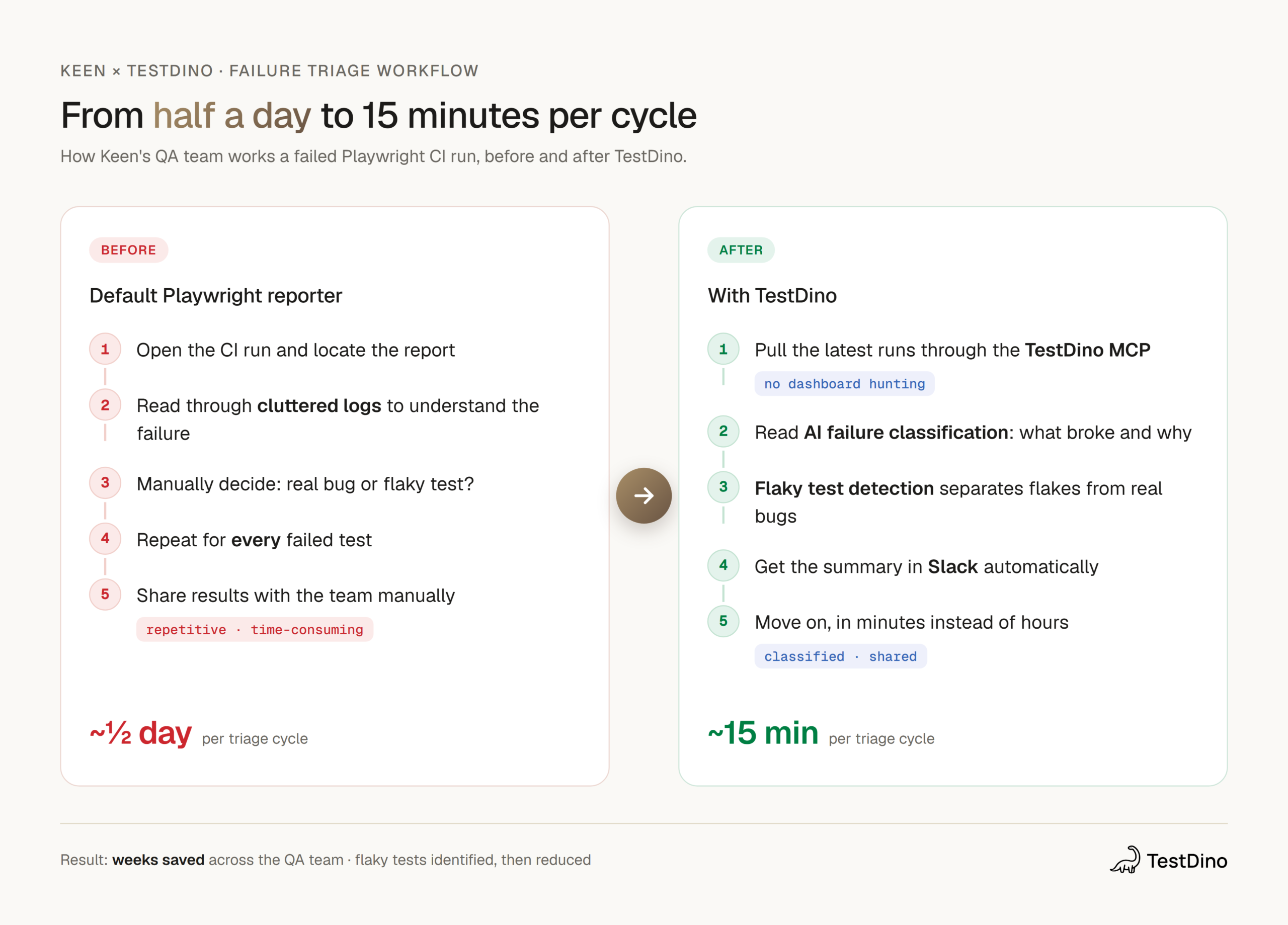
The MCP + AI classification did the heavy lifting, and the Slack reports closed the loop.
The AI insights on test failures are useful, and getting reports in Slack was crucial.
Where TestDino Helped
Keen connected TestDino through a Slack webhook and leans on a focused set of features day to day:
1. TestDino MCP
The standout. Pulling the latest runs through the MCP let Daniel triage failures inside his own flow instead of clicking through reports. It is the feature he points to as the one that changed things.
The MCP is the tool that changed things for us. It really cut down our time spent working on test bugs.
2. AI Failure Classification
TestDino categorizes each failure so the team can tell at a glance whether something is a code issue, infrastructure, or a flake. That removed the manual "is this real?" step that used to eat up the most time.
3. Flaky Test Detection
Flaky tests were on the rise before TestDino. With failure patterns surfaced clearly, the team could finally find the flakes, then target them directly.
We were able to identify the flaky tests much more easily, and we were then able to target them to greatly reduce the number of flakes.
4. Slack Integration
Reports land in Slack automatically. The team sees what failed without anyone opening a dashboard or chasing a link.
5. Error Analytics and PR Dashboard
Analytics across runs and a PR-level view gave Keen the patterns the default reporter never showed, so the team could see trends rather than one-off results.
Results After Adopting TestDino
| Area | Before TestDino | After TestDino |
|---|---|---|
| Failure triage | Up to half a day per cycle | About 15 minutes |
| Debugging | Combing through cluttered logs per failure | AI-classified failures, read in minutes |
| Flaky tests | Increasing, hard to track | Identified easily, then targeted and reduced |
| Sharing results | Manual effort to share | Automatic reports in Slack |
| Team time | Hours lost to manual analysis | Weeks saved overall |
Triage time dropped from half a day to minutes
The headline result. What used to take half a day now takes Daniel about 15 minutes.
Yes, the MCP has saved hours. I can now run through the failures in minutes instead of devoting half of a day to it.
Flaky tests went from rising to reduced
Once flakes were easy to spot, the team could target them and bring the number down, instead of letting them pile up.
The team saved weeks of work
Add up the saved hours per cycle, across the team, and it lands at weeks.
TestDino has saved us weeks by helping us avoid combing through cluttered logs per failed or flaky test to triage
What Would Regress if TestDino Were Removed
Take TestDino away, and Keen goes back to the default reporter, which means back to half-day triage cycles, manual log reading per failure, and no clean way to separate flaky tests from real bugs. The MCP shortcut disappears, the AI classification disappears, and the Slack visibility disappears with it. The hours come back, and so do the flakes.
Who Benefits Most at Keen
At Keen, TestDino is a QA tool. Daniel and the QA team are the ones in the failures every day, and they are the ones who get the time back. For a team running Playwright async with development, the value is direct: less time triaging, fewer flakes, and results that show up in Slack without anyone going to look for them.
Final Takeaways
Keen's story comes down to three things any Playwright team can repeat:
- The MCP collapses triage time. Pulling runs through the TestDino MCP let Daniel work failures inside his own flow, turning half a day into 15 minutes.
- AI classification removes the guesswork. Knowing whether a failure is a real bug or a flake, up front, kills the slowest part of triage.
- Flaky tests get findable, then fixable. Surfacing flakes clearly is what lets Keen actually reduce them instead of fighting them.
Setup took minutes. Daniel rated it 9 out of 10 for ease and called support fast when he needed it.
Excellent tool that keeps improving, and customer support that is quick
Table of content
Flaky tests killing your velocity?
TestDino auto-detects flakiness, categorizes root causes, tracks patterns over time.
Follow Us