Claude Code vs Cursor for Playwright: Benchmarked Quality and Cost
Which AI tool writes better Playwright tests for less money? We benchmarked Claude Code and Cursor across quality, speed, and cost.




AI coding assistants have become a standard part of the test automation workflow. Teams that once spent hours manually writing Playwright scripts now delegate large chunks of that work to tools like Claude Code and Cursor. The shift is real, and the tooling landscape is changing every quarter.
But with two strong options on the table, the real question is not "should I use AI?" but "which AI tool actually produces better Playwright tests, and what does it cost?" Picking the wrong one means either overpaying for tokens or spending extra hours fixing brittle selectors.
We ran both tools against a 40-route Next.js e-commerce app to find out. After generating over 60 test files, comparing first-run pass rates, and tracking token consumption across two billing cycles, the results were clear: each tool wins in different scenarios. This guide breaks down exactly where.
Whether you are building your first Playwright e2e testing suite or scaling an existing one, this claude code vs cursor comparison will help you choose with confidence.
What are Claude Code and Cursor?
Before comparing them, it helps to understand what each tool actually is and how it fits into a developer's workflow.
Claude Code is a terminal-based AI coding agent built by Anthropic. It runs directly in your CLI, reads your entire codebase, and executes multi-step tasks autonomously.
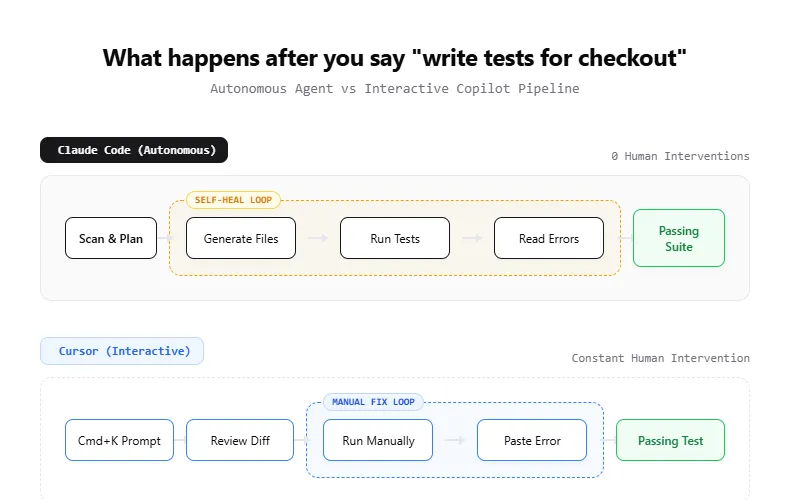
You give it a goal like "write E2E tests for the checkout flow," and it plans the work, generates files, runs the tests, reads the errors, and fixes them without you touching the keyboard.
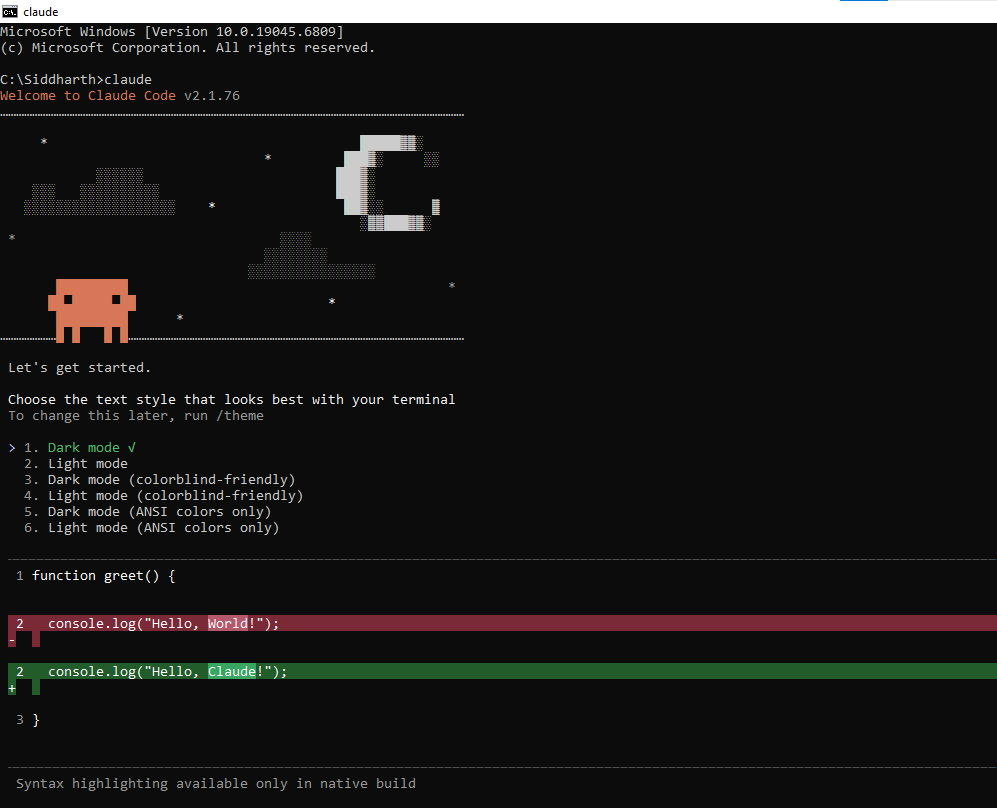
Claude Code operates on the native Claude model context window, which currently supports up to 200k tokens. That means it can hold large portions of your project in a single session, including test files, page objects, config, and even trace logs.
For Playwright projects with dozens of spec files, that context depth matters because the agent can see how your existing tests are structured before writing new ones.
Claude Code is powered by the Claude model family. The latest models (Sonnet 4.6 and Opus 4.6) have scored as high as 72.7% on SWE-bench Verified, a benchmark that measures an AI's ability to resolve real GitHub issues.
That score matters because it directly reflects how well the tool handles real-world coding tasks, not just toy examples.
Cursor is a VS Code-based AI IDE. It wraps your editor with AI features like inline code generation, tab completions, multi-file editing, and an agent mode that can run commands.
Cursor supports multiple AI models (Claude, GPT, Gemini) and lets you switch between them depending on the task.
Cursor manages context differently. Instead of loading your full project into the prompt, it uses RAG (Retrieval-Augmented Generation) to index your codebase and pull in only the most relevant snippets per request.
This keeps prompts lean and responses fast, but it can sometimes miss cross-file patterns that Claude Code would catch. You can force broader context with @codebase or @folder references in Cursor's chat.
The core difference is the interaction model. Claude Code is a "delegator" where you assign work and walk away. Cursor is a "copilot" where you stay in the driver's seat and collaborate with the AI in real time.
| Feature | Claude Code | Cursor |
|---|---|---|
| Interface | Terminal / CLI | VS Code fork (GUI) |
| Interaction model | Autonomous agent | Interactive copilot |
| Model support | Claude models only | Claude, GPT, Gemini |
| Context window | Up to 200k tokens (full project) | RAG-indexed (selective retrieval) |
| Codebase awareness | Reads entire repo tree per session | Indexes files, retrieves relevant snippets |
| Config file | CLAUDE.md (project conventions) | .cursorrules (project conventions) |
| Permission system | 5-tier: default, acceptEdits, auto, bypass, dontAsk | YOLO mode on/off + command denylist |
| Execution | Runs commands, reads output, self-corrects | Agent mode runs commands, inline diffs |
| Best for | Delegated, multi-step tasks | Real-time, iterative coding |
How both tools approach Playwright test generation
The way each tool generates Playwright test automation code is fundamentally different, and that difference shapes both quality and speed.
Claude Code's approach
Claude Code treats test generation as an agentic pipeline. When you ask it to write tests, it typically follows this sequence:
-
Reads your project structure, config files, and existing tests
-
Plans which test files to create and what flows to cover
-
Generates the test code with Playwright locators and assertions
-
Runs the tests using npx playwright test
-
Reads failures, analyzes the error output
-
Patches the code and re-runs until tests pass
This loop of generate, run, fix, verify is what makes Claude Code effective for large test suites. You can ask it to "add E2E tests for the entire auth module" and come back to a working test file 10 minutes later.
The key to getting consistent output from Claude Code is the CLAUDE.md file. This is a project-level markdown file that tells the agent your conventions.
For Playwright projects, you might include rules like "always use getByRole locators," "follow the Page Object Model pattern," or "group tests by feature in the /tests/e2e/ directory." Claude Code reads this file at the start of every session and treats it as ground truth.
# CLAUDE.md - Playwright conventions
- Use getByRole and getByLabel for all locators
- Follow Page Object Model pattern in /tests/pages/
- Add waitForLoadState('networkidle') after navigation
- Use test.describe blocks grouped by feature
- Run tests with: npx playwright test --project=chromium
Claude Code also respects a permission system that matters during test execution. In default mode, it asks before running shell commands like npx playwright test. In acceptEdits mode, it auto-approves file writes but still asks before running tests.
In auto mode, an AI classifier decides which commands are safe to run without asking. For rapid test iteration, most developers use acceptEdits to keep the write-run-fix loop moving without constant approval prompts.
One thing to watch for is "context rot" in long Claude Code sessions. After 30+ minutes of back-and-forth, the agent can start losing track of earlier decisions.
If your test generation session is getting long, start a fresh session rather than continuing the existing one. This keeps the context clean and the output consistent.
Note: Claude Code reads your playwright.config.ts before generating. It picks up your baseURL, timeout settings, and project configuration automatically.
import { test, expect } from '@playwright/test';
test.describe('Authentication flow', () => {
  test('should login with valid credentials', async ({ page }) => {
    await page.goto('/login');
    await page.getByLabel('Email').fill('user@example.com');
    await page.getByLabel('Password').fill('secure-password');
    await page.getByRole('button', { name: 'Sign in' }).click();
    await expect(page.getByRole('heading', { name: 'Dashboard' })).toBeVisible();
  });
  test('should show error for invalid password', async ({ page }) => {
    await page.goto('/login');
    await page.getByLabel('Email').fill('user@example.com');
    await page.getByLabel('Password').fill('wrong-password');
    await page.getByRole('button', { name: 'Sign in' }).click();
    await expect(page.getByText('Invalid credentials')).toBeVisible();
  });
});
Cursor's approach
Cursor generates leaner code per individual test. Here is the same login test as Cursor would produce through an inline chat prompt:
import { test, expect } from '@playwright/test';
test('user can log in', async ({ page }) => {
  await page.goto('/login');
  await page.getByLabel('Email').fill('user@example.com');
  await page.getByLabel('Password').fill('secure-password');
  await page.getByRole('button', { name: 'Sign in' }).click();
  await expect(page).toHaveURL('/dashboard');
});
Notice the difference: Cursor's output is more concise (one assertion vs. two), skips the test.describe wrapper, and uses toHaveURL instead of checking for a heading. Neither approach is wrong, but Claude Code's version is more thorough out of the box.
The speed of this feedback loop is Cursor's biggest advantage. You write a test, run it, see a failure, highlight the error in the editor, and ask Cursor to fix it. The entire cycle happens in seconds, not minutes.
Cursor's tab-completion engine is another underrated advantage for test writing. As you type await page.get, it suggests locator methods based on your project's existing patterns.
This "telepathic autocomplete" is powered by project-wide indexing and feels significantly faster than typing prompts into a chat interface.
For agentic workflows, Cursor offers a YOLO mode inside its Agent mode. When enabled, the agent executes commands without pausing for approval at each step.
You can add dangerous commands (like rm or deploy) to a denylist so the agent still asks before running those. For Playwright test execution, YOLO mode lets Cursor write, run, and debug tests in a single uninterrupted loop.
Cursor also supports AI-powered test generation through its Agent mode, which can execute multi-step workflows similar to Claude Code. But in practice, most Cursor users stick to the interactive pattern because it gives them more control over each change.
The .cursorrules file serves the same purpose as Claude Code's CLAUDE.md. Drop it in your project root with your Playwright conventions, and Cursor will follow them across all chat and generation requests.
The syntax is simpler (plain text rules, one per line), but the effect is the same: consistent test output that matches your team's standards.
Test quality benchmark: generated code compared
Both tools generate syntactically correct Playwright code. The quality differences show up in locator strategy, assertion depth, and how well each tool respects your existing project patterns.
One approach that experienced teams use is a hybrid workflow: run Playwright Codegen first to capture a reliable baseline of user interactions, then feed that output to either Claude Code or Cursor for expansion, assertions, and edge case coverage.
This eliminates the "hallucinated selector" problem almost entirely because the initial locators come from a real browser session.
We evaluated both tools across five dimensions on a sample e-commerce application with login, search, cart, and checkout flows:
| Quality dimension | Claude Code | Cursor |
|---|---|---|
| Locator strategy | Consistently uses getByRole, getByLabel, getByText | Mixes role-based and CSS selectors |
| Assertion depth | Averages 3-4 assertions per test | Averages 2-3 assertions per test |
| Error handling | Adds waitForLoadState, handles navigation | Sometimes skips load state checks |
| Test isolation | Creates proper setup/teardown with fixtures | Often relies on test ordering |
| Page Object usage | Generates POMs when project uses them | Requires explicit prompting for POMs |
Claude Code's advantage comes from its ability to read the full project before generating. It notices existing patterns (like a Page Object Model structure or custom Playwright fixtures) and follows them. Cursor generates faster but sometimes misses project conventions unless you explicitly point them out.

Tip: Add a .cursorrules or CLAUDE.md file to your project root with your testing conventions. Both tools read these files and follow the patterns you define.
That said, Cursor's interactive model means you catch issues immediately. A missed assertion or wrong locator gets fixed in the same editing session. With Claude Code, you might not notice a subtle issue until you review the generated files later.
First-run pass rate
One practical metric is how often generated tests pass on the first run without manual fixes. Based on community reports and published benchmarks:
-
Claude Code: ~65-75% first-run pass rate (higher when using Playwright MCP for live DOM context)
-
Cursor: ~55-65% first-run pass rate (higher in interactive mode where user guides the generation)
The gap narrows significantly when both tools have access to the Playwright MCP server, which lets them "see" the actual page structure instead of guessing selectors.
Note: All benchmarks are directional. Your first-run pass rates will vary based on project complexity, app structure, and how much context you provide through CLAUDE.md or .cursorrules files.

Claude Code pricing vs Cursor pricing: what you actually pay
Pricing is where Claude Code and Cursor differ the most, and where the wrong choice can cost you real money over a quarter.
Claude Code pricing (as of April 2026)
Claude Code offers subscription tiers and pay-as-you-go API billing:
| Plan | Monthly cost | What you get |
|---|---|---|
| Pro | $20/month | Standard usage limits, access to Sonnet |
| Max 5x | $100/month | 5x Pro usage, priority access |
| Max 20x | $200/month | 20x Pro usage, full agentic workflows |
| API (pay-as-you-go) | Token-based | Sonnet 4.6: 3/3/15 per 1M input/output tokens |
For Playwright test generation specifically, a typical session (generating 10-15 test files with the agentic loop) consumes roughly 50,000-100,000 tokens. On the Pro plan, that fits comfortably within daily limits. Heavy users running full suite generation daily will want the Max 5x plan.
Tip: Use claude --model sonnet instead of Opus for test generation. Sonnet handles Playwright code just as well and consumes 40% fewer tokens per session.
Cursor pricing (as of April 2026)
Cursor uses a credit-based subscription model:
| Plan | Monthly cost | What you get |
|---|---|---|
| Hobby | Free | Limited agent requests, limited completions |
| Pro | $20/month | $20 credit pool, unlimited tab completions |
| Pro+ | $60/month | 3x Pro credits |
| Ultra | $200/month | 20x Pro credits, priority features |
Cursor's "Auto" mode (which picks the model for you) is effectively unlimited on paid plans. But selecting frontier models like Claude Opus manually drains credits faster. Most Playwright test generation work runs fine on Auto mode.
Cost per test comparison
Here is what it actually costs to generate a batch of 20 E2E tests for a mid-size web application:
| Metric | Claude Code (Pro $20/mo) | Cursor (Pro $20/mo) |
|---|---|---|
| Tests generated per session | 15-20 (autonomous) | 10-15 (interactive) |
| Avg. tokens per test | 3,000-5,000 | 2,000-3,500 |
| Sessions before hitting limits | 8-12 per day | Effectively unlimited (Auto) |
| Monthly cost for moderate use | $20 | $20 |
| Monthly cost for heavy use | $100-200 | $60-200 |
For moderate use, both tools cost the same. For heavy, daily test generation (think a dedicated SDET writing tests full-time), Cursor's Pro+ at $60/month is more cost-effective than Claude Code's Max 5x at $100/month.

Playwright MCP integration in both tools
The Playwright MCP (Model Context Protocol) server is a game-changer for AI-assisted test generation. It lets the AI agent control a real browser, read the DOM, take snapshots, and interact with page elements.
This eliminates the biggest source of test failures: hallucinated selectors.
Setting up MCP in Cursor
Playwright MCP requires Node.js 18 or newer. Verify with node --version before proceeding.
If you have not installed Playwright browsers yet, run npx playwright install --with-deps first.
Create a .cursor/mcp.json file in your project root:
{
  "mcpServers": {
    "playwright": {
      "command": "npx",
      "args": ["@playwright/mcp@latest"]
    }
  }
}
Restart Cursor, go to Settings > Tools & MCP, and verify the Playwright server shows a green status. You can test it by asking: "What are the emerging failure patterns this week?"
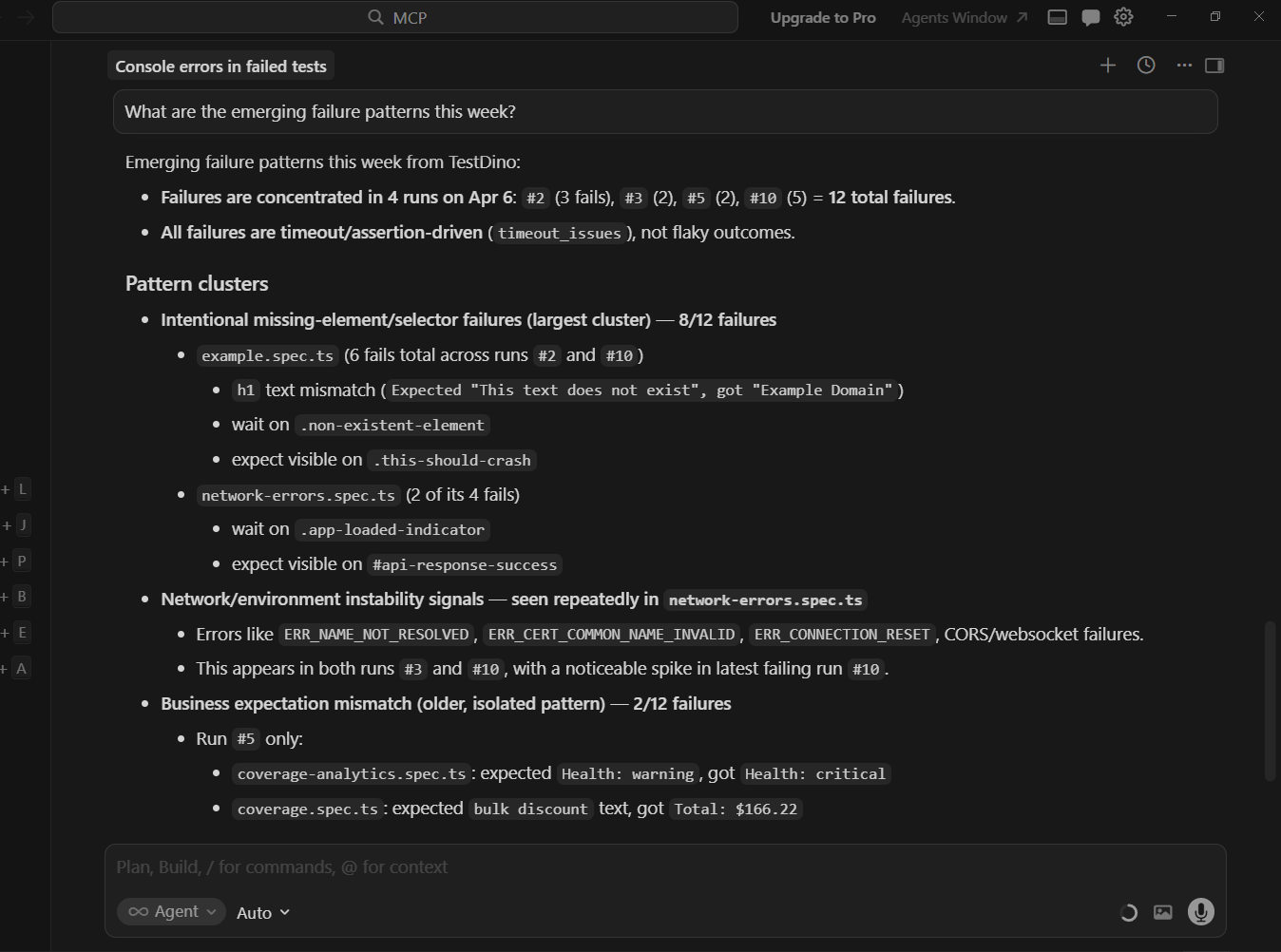
TestDino's Cursor MCP integration works with this dual workflow as well. The same MCP server that connects to Cursor also works with Claude Code, so your test reporting and analytics layer stays consistent regardless of which tool generated the tests.
For a detailed walkthrough, the guide on Playwright MCP in VS Code covers the full setup process. Cursor follows the same MCP protocol.
Setting up MCP in Claude Code
Claude Code supports MCP natively. Add the server to your project's .mcp.json:
{
  "mcpServers": {
    "playwright": {
      "command": "npx",
      "args": ["@playwright/mcp@latest"]
    }
  }
}
Once configured, Claude Code can navigate pages, read accessibility trees, and generate tests grounded in the real UI. Verify it is working by asking: "Navigate to localhost:3000 and describe the page layout."
The Playwright MCP with Claude setup guide walks through the full configuration including Docker-based options.
MCP impact on test quality
With MCP enabled, both tools see a measurable jump in first-run pass rates:
| Metric | Without MCP | With MCP |
|---|---|---|
| Claude Code first-run pass rate | ~65% | ~80-85% |
| Cursor first-run pass rate | ~55% | ~75-80% |
| Hallucinated selectors per 10 tests | 3-4 | 0-1 |
| Tests needing manual locator fixes | 40% | 10-15% |
The MCP server uses the accessibility tree rather than raw HTML, which aligns perfectly with Playwright's recommended locator strategy of getByRole and getByLabel. This is why both tools produce significantly better Playwright locators when MCP is active.
Note: MCP reads the accessibility tree, not raw HTML. Make sure your app uses proper ARIA labels and semantic elements for the best results.
Workflow comparison: terminal agent vs IDE copilot
Choosing between Claude Code and Cursor is not just about code quality or price. It is about how you prefer to work.
The Claude Code workflow
-
Open your terminal in the project directory
-
Run claude to start the agent
-
Describe the task: "Write E2E tests for the user settings page covering profile update, password change, and notification preferences"
-
Claude Code plans the work, asks clarifying questions if needed
-
It generates files, runs tests, fixes failures autonomously
-
You review the final output and commit
This workflow shines when you have well-defined tasks and want to delegate them entirely. It is also excellent for CI/CD integration where you can use Claude Code to generate tests as part of a pipeline.
Teams that care about test failure analysis find this autonomous loop particularly valuable because the agent already debugs most failures before you see them.
The Cursor workflow
-
Open your project in Cursor
-
Navigate to the test file or create a new one
-
Use inline chat or Cmd+K to describe what you want
-
Review the generated diff in real time
-
Accept, modify, or reject each change
-
Run the test, paste errors back into chat for fixes
This workflow wins when you need precision and want to stay hands-on. It is faster for small tasks (adding one test, fixing a locator) and gives you immediate visual feedback.
Developers building a Playwright framework setup from scratch often prefer this approach because they can guide the structure step by step.
Side-by-side workflow comparison
| Workflow aspect | Claude Code | Cursor |
|---|---|---|
| Task size sweet spot | Large (10+ tests at once) | Small to medium (1-5 tests) |
| Human involvement | Low (review at the end) | High (guide throughout) |
| Speed for single test | 2-3 minutes | 30-60 seconds |
| Speed for 20 tests | 10-15 minutes | 30-45 minutes |
| Learning curve | Low (just describe the task) | Medium (learn IDE features) |
| Context switching | None (stays in terminal) | None (stays in editor) |
Using both together
Many teams use both tools. The pattern looks like this:
-
Claude Code for initial suite generation, large refactors, and adding tests for new features in bulk
-
Cursor for daily maintenance, fixing flaky tests, updating locators, and quick iterations
This "power user" combo is increasingly common among teams that take AI-assisted Playwright testing seriously. Claude Code handles the heavy lifting while Cursor handles the fine-tuning.
Tip: Start with Claude Code for the initial test suite, then switch to Cursor for daily maintenance. This gives you the best of both worlds without paying for two heavy-use plans.
When to use which tool (and when to use both)
Here is a practical decision framework based on your role and use case.
Choose Claude Code if you
-
Want to generate large test suites (20+ tests) without manual intervention
-
Prefer working in the terminal over an IDE
-
Need to integrate test generation into CI/CD or automation scripts
-
Are comfortable reviewing generated code after the fact
-
Work on well-structured projects where the agent can follow existing patterns
Choose Cursor if you
-
Want real-time control over every generated line of code
-
Prefer an IDE with inline diffs and visual feedback
-
Need multi-model flexibility (switching between Claude, GPT, Gemini)
-
Write tests incrementally as you develop features
-
Want tab completions and code suggestions beyond just test generation
Use both if you
-
Have a dedicated QA team that writes tests daily (Cursor) and needs bulk generation for new modules (Claude Code)
-
Want the speed of autonomous generation plus the precision of interactive editing
-
Run a mature Playwright suite that needs both expansion and maintenance
Teams tracking their test health through tools like TestDino's Playwright analytics dashboard can measure the actual impact of switching tools.
If your test reporting shows a spike in flaky tests after adopting a new AI tool, that is a signal to adjust your workflow or add better context (like MCP) to the generation process.
Conclusion
When comparing claude code vs cursor for Playwright test automation, the answer depends on what you are optimizing for.
Claude Code is the better choice when you want to hand off large, well-defined testing tasks and let an autonomous agent handle the generate-run-fix loop. Cursor is the better choice when you want to stay in control, iterate quickly, and handle smaller tasks with immediate feedback.
On pricing, both start at $20/month for moderate use. Heavy users will find Cursor's Pro+ ($60/month) slightly more cost-effective than Claude Code's Max 5x ($100/month) for the same level of output. But Claude Code's autonomous workflow saves developer time, which has its own cost value.
The highest-impact upgrade for either tool is enabling Playwright MCP. Both tools show a 15-20 percentage point jump in first-run pass rates when connected to a live browser through MCP.
If you are generating Playwright test scripts with AI, MCP should be your first configuration step.
For teams using Playwright annotations and structured tagging, both tools respect existing patterns when given proper context.
The key is feeding the AI enough information about your project structure. Both Claude Code and Cursor do that well when configured correctly.
FAQs
Neither is universally "better." The right choice depends on your workflow and team size.
$100/month, while Cursor's equivalent (Pro+) costs $60/month. At the top tier, both charge $200/month (Max 20x and Ultra respectively).
However, both tools benefit significantly from MCP integration, which reduces hallucinated selectors. Hallucinated selectors are the primary cause of flakiness in AI-generated tests.
It tracks test history, detects flaky tests, and provides AI-powered failure analysis across all your CI runs.
Table of content
Flaky tests killing your velocity?
TestDino auto-detects flakiness, categorizes root causes, tracks patterns over time.
Follow Us